Review Comments (0) Screenshots (1) Questions & Answers (0) Votes (0) Awards (9) Wiki  
-Please log in to rate
0 0/5 (0)
-UInterface
-5.1.0.1
- www.uinterface.com
- 22 people
Download MouseLaunch

621.84 KBDownloaded 96 times


Review

This review applies to version 4.9 The latest version of this software will soon be reviewed by our informers.

MouseLaunch is a quickest program launcher that is activated by one mouse gesture. MouseLaunch uses a built-in unique technology of detecting both mouse button pressing and it enables the complete new user interface of using mouse and launching programs.
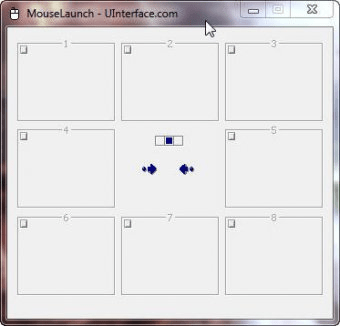
You can activate the launcher by holding down both mouse buttons at any location in Windows. Once the launcher activated, move the mouse cursor a little to the registered program/file (eight-direction) and click to launch. Once you experienced, it will takes less than 1 second for entire action. MouseLaunch has 3 sections (center, left, right) and each section contains 8 panels for program/file registering. With SHIFT key combination, you can register programs/files up to 48.
MouseLaunch supports a drag-and-drop to register your favorite application programs and files to the launcher panels. You can drag and drop a file from desktop area, Start menu, Quick Launch, Windows Explorer and even from favorities in the Internet Explorer.
MouseLaunch also supports two special panels - Emailer, Text Clipboard - for fast emailing and copying text to the clipboard.
In this version, more vista compatibility and user interface improved.

Screenshots

Main Window Main Window

Latest comments


There are no comments, be the first one!
Add new comment
Download siClient

Email Address:

Password:

Register now »

Forgot password?

Copyright © 2009, Informer Technologies, Inc. About| Privacy and terms| Help| Feedback